


Script to add/remove site collection admin from OneDrive and SharePoint sites
- Sep 26, 2020
- 2 min read
Updated: Sep 27, 2020

Below scripts come handy while administering the OneDrive and SharePoint sites in production environment as it reduces the hectic manual task of adding site collection admins in different sites.
PowerShell Script to Set Secondary Site Collection Admin for all OneDrive for Business sites:
Function Add-OnedriveSecondaryAdmin($AdminURL,$SecondaryAdmin)
{
#Connect SPOService.
Connect-SPOService -Url https://footballlife-admin.sharepoint.com
#Get all Onedrive URL's.
$OneDriveURLs = Get-SPOSite -IncludePersonalSite $true -Limit All -Filter "Url -like '-my.sharepoint.com/personal/'"
foreach($OneDriveURL in $OneDriveURLs)
{
#Add Secondary administrator to OneDrive Site.
Set-SPOUser -Site $OneDriveURL.URL -LoginName "Ankit@footballlife.onmicrosoft.com" -IsSiteCollectionAdmin $True -ErrorAction SilentlyContinue
Write-Host "Added secondary admin to the site $($OneDriveURL.URL)"
}
}
Add-OnedriveSecondaryAdmin -SecondaryAdmin "Ankit@footballlife.onmicrosoft.com" -AdminURL https://footballlife-admin.sharepoint.com
Output will be like as shown below:
It will query for each OneDrive site existing on tenant and add the mentioned secondary admin in script to those sites.
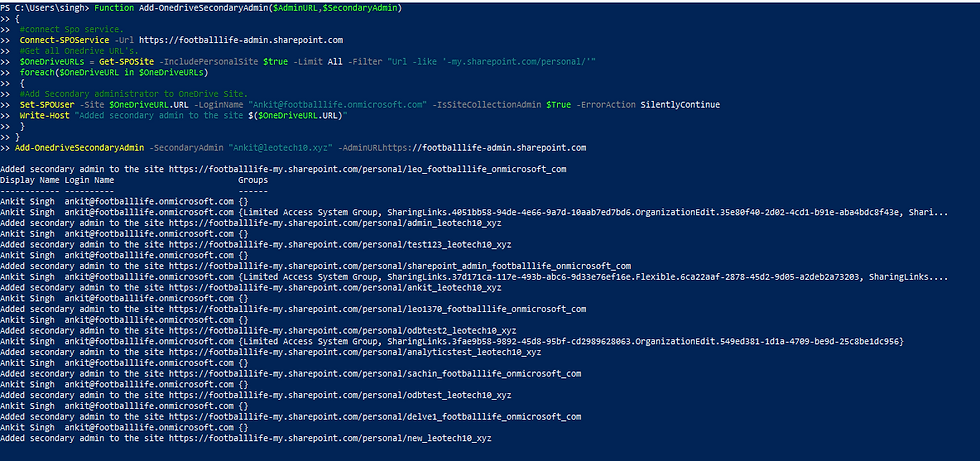
Now let say there is a requirement to remove a specific user from all sites where he is added as site collection admin.
For OneDrive sites below script can be used to remove specific user added as site collection admin on existing sites:
Function Add-OnedriveSecondaryAdmin($AdminURL,$SecondaryAdmin)
{
#Connect SPOService.
Connect-SPOService -Url https://footballlife-admin.sharepoint.com
#Get all Onedrive URL's.
$OneDriveURLs = Get-SPOSite -IncludePersonalSite $true -Limit All -Filter "Url -like '-my.sharepoint.com/personal/'"
foreach($OneDriveURL in $OneDriveURLs)
{
#Add Secondary administrator to OneDrive Site.
Set-SPOUser -Site $OneDriveURL.URL -LoginName "Ankit@footballlife.onmicrosoft.com" -IsSiteCollectionAdmin $False -ErrorAction SilentlyContinue
Write-Host "Removed secondary admin to the site $($OneDriveURL.URL)"
}
}
Add-OnedriveSecondaryAdmin -SecondaryAdmin "Ankit@footballlife.onmicrosoft.com" -AdminURL https://footballlife-admin.sharepoint.com
Output will be as shown below:

Below script can be used to achieve the task for SharePoint sites.
Import-Module Microsoft.Online.Sharepoint.PowerShell -DisableNameChecking
#Variables for processing
$AdminURL = "https://contoso-admin.sharepoint.com/"
$AdminAccount="Admin@contoso.com"
#Connect to SharePoint Online
Connect-SPOService -url $AdminURL -credential (Get-Credential)
#Get All Site Collections
$Sites = Get-SPOSite -Limit ALL
#Loop through each site and add site collection admin
Foreach ($Site in $Sites)
{
Write-host "Scanning site:"$Site.Url -f Yellow
#Get All Site Collection Administrators
$Admins = Get-SPOUser -Site $site.Url | Where {$_.IsSiteAdmin -eq $true}
#Iterate through each admin
Foreach($Admin in $Admins)
{
#Check if the Admin Name matches
If($Admin.LoginName -eq $AdminAccount)
{
#Remove Site collection Administrator
Write-host "Removing Site Collection Admin from:"$Site.URL -f Green
Set-SPOUser -site $Site -LoginName $AdminAccount -IsSiteCollectionAdmin $False
}
}
}
Script to add secondary domain on specific OneDrive URLs in CSV file:
CSV file used in script should be like as shown below containing all sites where secondary admin need to be added:

#Command to set the location on PowerShell where CSV file is located:
Set-Location "C:\Test\New\Domains1.csv"
param(
[Parameter(Mandatory=$true,HelpMessage="This is the name of the O365 tenant",Position=1)]
[string]$TenantName,
[Parameter(Mandatory=$true,HelpMessage="This is the O365 Admin account to log into the tenant",Position=2)]
[string]$AdminAcct,
[Parameter(Mandatory=$true,HelpMessage="This is the account to ADD on each ODFB",Position=3)]
[string]$SecondAdmin,
[Parameter(Mandatory=$true,HelpMessage="This is the CSV file containing the ODFB Urls",Position=4)]
[string]$ODFBCsvFile
)
# URL for your organization's SPO admin service
$AdminURI = "https://$TenantName-admin.sharepoint.com"
#Import Urls
$UrlLocation = Import-Csv $ODFBCsvFile
#Connect to SPO
Connect-SPOService -Url $AdminURI -Credential $AdminAcct
Write-Host "Connected to SharePoint Online" -f Green
foreach($Url in $UrlLocation){
$CorrectSitePath = ($Url.OneDriveUrl).trimend("/")
Set-SPOUser -Site $CorrectSitePath -LoginName $SecondAdmin -IsSiteCollectionAdmin $true
}
Write-Host "Account $SecondAdmin added." -f Green
Output will be as shown below:

Thank you for visiting the blog, Please do share your feedback if you liked it so that I can come up with more such blogs for community.
Because, "Sharing is Caring...!!"
Comments